
Indagate separates setup into small, testable outcomes. You can start with a browser and a safe sample event, then add edge hardware or plant integrations only when your role requires them.
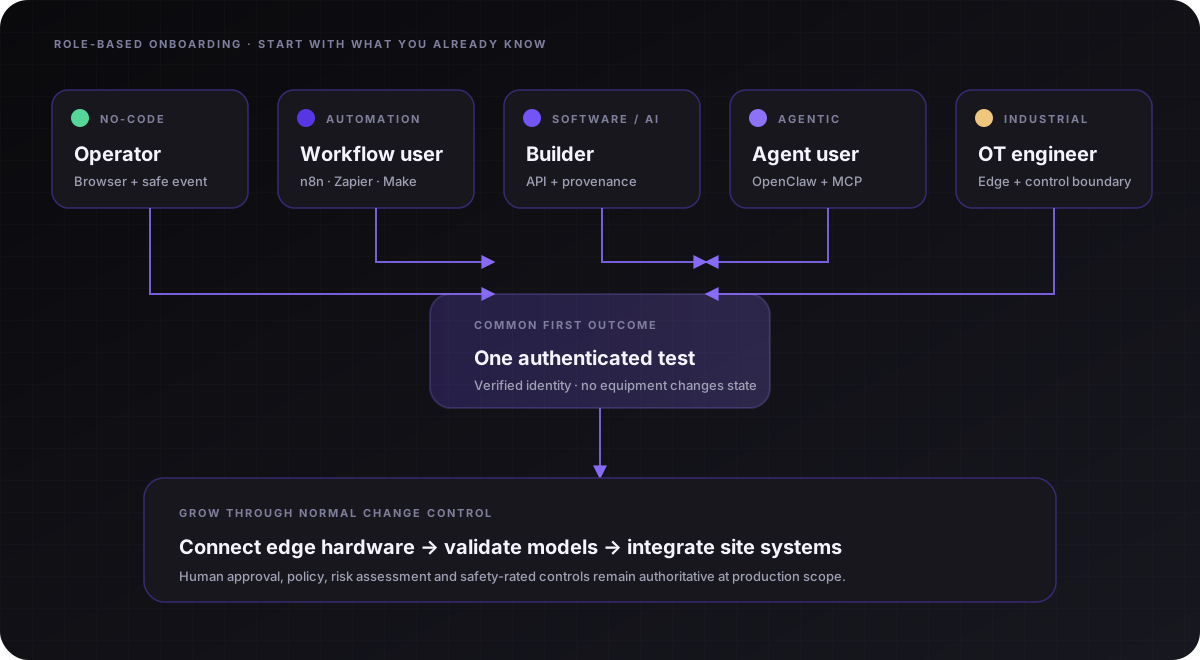
Choose a pathway
| You are coming from... | Start with | First useful outcome |
|---|---|---|
| Operations, quality or security | No-code operator | Connect a workflow and see a verified event without writing code |
| Zapier, Make, n8n or business systems | Automation bridge | Map familiar webhook concepts to tenant-scoped industrial events |
| Data, AI, software or another industry | Cross-industry bridge | Use MCP to inspect governed fleet context and provenance |
| OpenClaw or another agent platform | Agent pathway | Connect read-only MCP tools and a separate signed event webhook |
| Controls, robotics or OT | Industrial pathway | Enrol edge compute and define the PLC/safety boundary |
Path A: no-code operator
- Open Platform → Integrations & agents.
- Choose No-code user, then select n8n, Zapier or Make.
- Paste the generated HTTPS endpoint and shown-once bearer credential into an HTTP/Webhook step.
- Choose Send a safe test event. Confirm the wizard says Verified and a test endpoint appears.
- Replace only the sample field mapping with your workflow data. Keep the credential in the platform's secret store.
Definition of done: one authenticated test event appears in your tenant; no production equipment or control path changes state.
Path B: OpenClaw or another LLM agent
- Choose AI agent user in Platform.
- Create a short-lived personal API token and store it as
ODDESSY_API_TOKENin the agent/Gateway secret environment. - Use the copyable OpenClaw or generic MCP setup and run a connection probe.
- Ask the agent to list stale devices or model provenance. It receives read-only tenant context.
- Create a separate inbound webhook when the agent workflow must send structured events into Indagate, or an outbound destination when it must receive Indagate lifecycle events.
MCP reads governed Indagate context. Inbound webhooks receive events into Indagate. Outbound webhooks deliver signed Indagate lifecycle events to a configured HTTPS receiver. None of these paths writes PLC values, approves deployments or proves a physical action occurred.
Path C: bridging from software, data or robotics
| Familiar idea | Indagate equivalent |
|---|---|
| Workspace or account boundary | Tenant partition |
| Versioned model artifact | Model provenance: source, version, runtime and SHA-256 |
| Local service/runner | Indagate Edge runtime on Ubuntu, QCS6490 or Windows |
| API callback | Authenticated inbound webhook or signed outbound destination |
| Agent tool connector | Read-only Model Context Protocol service |
| Production approval gate | Human, policy and authoritative industrial-control path |
Path D: controls and OT engineer
- Review the agreed deployment boundary and public safety guidance with the accountable site owner.
- Enrol an isolated reference node and verify heartbeat, camera and model manifest.
- Connect a non-production event source and validate identity, retry and retention behavior.
- Document zones, conduits, credential ownership, acknowledgement paths and fail-safe behavior.
- Promote only through the site's existing change-control and risk-assessment process.
When you get stuck
Return to the last verified outcome instead of changing several layers at once. Capture the connector name, timestamp, HTTP status and whether the safe test event appeared. Send that context to info@oddessy.io without including tokens or production data.